Step-by-step instructions on how to find and access the Individual Quality Improvement Subscription.
Thank you for purchasing the Open School Individual Professional Patient Safety Subscription. We appreciate your interest and commitment to the IHI Open School .
Allow 24 hours, after purchase, for your courses to be accessible.
Please follow the steps below to access your subscription.
- Logon at https://education.ihi.org/topclass/and navigate to the 'Browse Catalog' section.
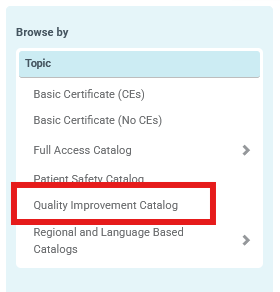
- Locate the 'Topic' filter on the left-hand side and select the 'Quality Improvement Catalog" option.
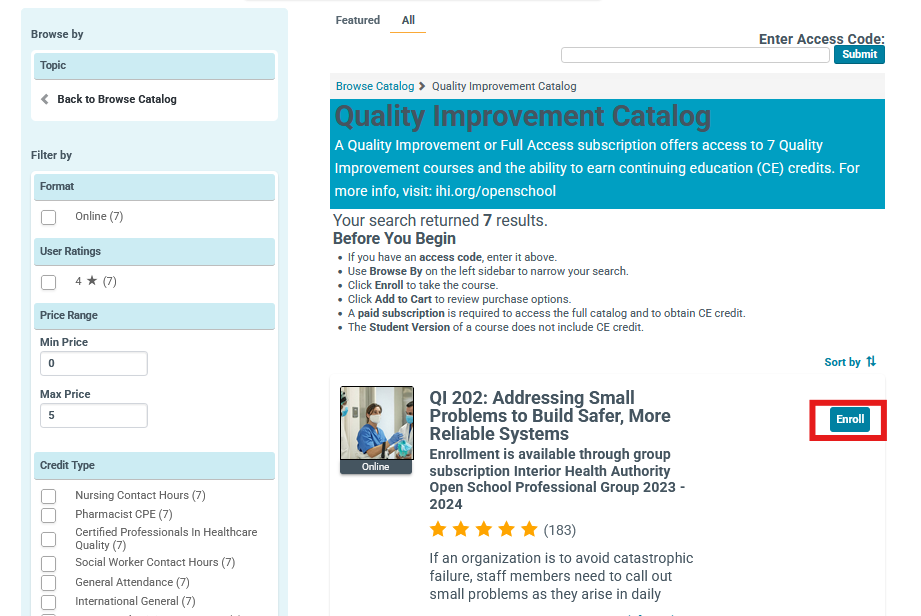
3. You will be able to enroll in the courses by clicking the 'Enroll' button.
Note: You may need to scroll down or click the 'More Results" link to populate additional Quality Improvement courses.
Please reach out to [email protected] if your access is not live after 24 hours (this does not include weekend subscriptions).